Google Gemini Politicians Ai Photo Editing Prompt – You know that Bihar is currently experiencing elections, and you’ll notice that many young people support multiple parties. This means everyone has a favorite party. Everyone supports a particular party and posts a photo with that party. Follow modern professional methods for this, as this will ensure your photo looks stunning and will be well-liked. A prompt for this editing is provided here. Using it, you can create a truly amazing edit by simply following the copy-and-paste method, as I’ll explain. Just follow along, and you’ll have a truly amazing edit.
For this, you simply use one of your photos, and it will create a photo with your favorite party. You can take advantage of this and turn it into a source of income. What happens is that most politicians and people associated with this type of organization don’t know anything about it. They know how to give speeches and explain things to people, but if you create and share something like this with them, they’ll be overjoyed. You can take advantage of this and earn money from them. You’ll say, “I’ll create your photo for you,” and in return, you can charge them a certain amount of money. This will become a source of income, and now, during election time, you can earn money from all parties.
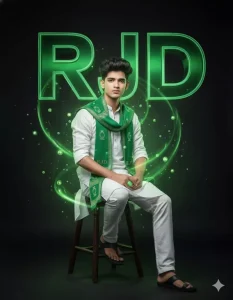
Ultra-photorealistic studio portrait of a man, meanwhile, keeping the same face and hairstyle as in the image. He is sitting on a classy stool, while glowing green lights surround him. The background is black, and moreover, a bold green 3D RJD symbol appears behind him, styled like a fashion poster. He wears a white kurta and white pajamas, along with a green RJD khesh featuring green lantern symbols and black chapals. Finally, the image should have realistic skin texture, soft studio lighting, and sharp details.
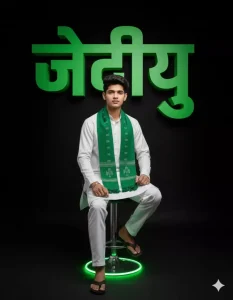
Ultra-photorealistic studio portrait of a man (same face and hairstyle as in the uploaded image) sitting on a classy tool, with glowing green lights. Black background with bold Green 3D Hindi text "जेडीयू" (JDU) behind him, styled like a fashion poster. He wears a white kurta and white pajamas with a Green RJD arrow with symbols and black chapals. Realistic skin texture, soft studio lighting, sharp details."
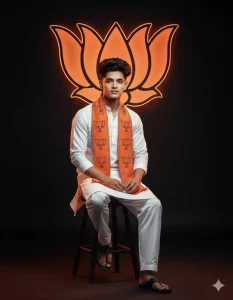
Ultra-photorealistic studio portrait of a man (same face and hairstyle as same in image) sitting on a classy tool, with glowing orange lights. Black background with bold orange 3D BJP Symbol behind him, styled like a fashion poster. He wears a white kurta and and white pajamas with orange BJP khesh with symbols and black chapal,Realistic skin texture, soft studio lighting, sharp details.
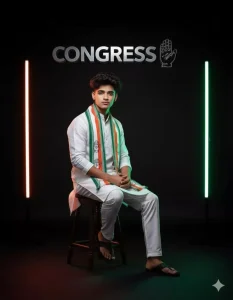
Ultra-photorealistic studio portrait of a man (same face and hairstyle as in the image) while sitting on a classy stool, surrounded by tricolor glowing lights — saffron, white, and green. The background is black, and moreover, it features a bold 3D “CONGRESS” text and hand symbol in the center, styled like a fashion campaign poster. He wears a white kurta-pajama with a tricolor Congress stole decorated with hand symbols, and black chappal. Soft cinematic lighting, ultra-realistic details, elegant composition.
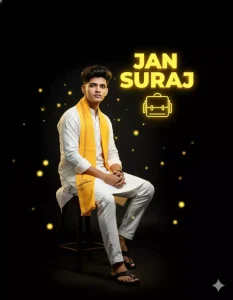
Ultra-photorealistic studio portrait of a man (same face and hairstyle as in the image) sitting on a classy stool, surrounded by yellow glowing lights. Black background with a bold 3D “JAN SURAJ” text and “school ka basta” symbol in the center, styled like a modern poster. He wears a white kurta-pajama with a yellow Jan Suraj stole, and black chappal. Sharp cinematic detail, modern fashion lighting.
How To Select Photos?
Now, for this, you need to prepare a photo that’s a selfie of your own. Your face should be perfectly visible. If your face is perfectly visible, it looks amazing. That’s why people nowadays use traded photos to create their photos. I’ll tell you that if you want to create such a photo, it’s not too difficult these days. I’ll guide you step-by-step on how to create one. You’ll see for yourself how amazing your editing is after following this method.
How To Create Google Gemini Politicians Ai Photo Editing Prompt
First of all you copy the prompt. For whatever prompt is provided to you, you are given a copy button there. If the button is not added here now, then it will definitely be added here in the future. For now, you can copy it by selecting it. Tap and select it and there you will get the copy button. Click on it and copy it. Now use Google Gemini there. What happens in Google Gemini. Your photo is ready amazingly, so first of all you have to go to the plus option and upload the photo there and then paste the prompt. Then click on the update option, then click on the generate option and it will make your amazing photo ready. Seeing which you will be surprised that such a photo can also be created.
Conclusion
You’ll perform this editing by following these trading steps, which I’ve guided you through step by step. I’ve explained everything in detail. Now, let us know how much you understood this editing and how much you liked it. If you liked it even a little, please let us know in the comments.