Instagram Trending Rain Ai Photo Editing Google Gemini Prompts – You must have heard about this viral trend of photo editing. At one time, it also became very viral and you should also take such a photo because this type of photo is very trendy on Instagram in which people are creating photos of different rains, so how can you create such a photo? How much effort do you think it will take to create such a photo? It will not take any effort at all. If you do your editing as per our instructions, your editing will be done in a jiffy and it will also go viral. I will guide you step by step completely on how you can create this viral editing and go viral.
Look, creating a live photo isn’t a big deal these days, but you need to know the right method. Only then will editing seem easy, and that’s what I’m about to share with you. I’ll share tips that will allow you to create this photo in just one click. We’ll use AI for this. You know the significant contribution of AI today. We can now perform any number of edits in our editing with just one click. All we need is a little idea of the type of editing we want. The rest is automatically achieved, and that’s what we’re going to teach here. We can generate this in just one click and make our edits go viral, and everything will be step-by-step. Just follow along and keep creating.
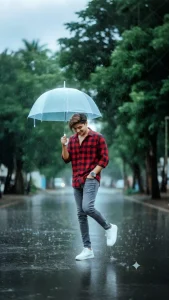
Use reference face of uploaded image & generate new image in which " An Indian man standing on a wet street during light rain, holding a transparent umbrella with his right hand. He is wearing a red vith black checked shirt with sleeves rolled up, grey slim-fit jeans, and white chunky sneakers. His head is slightly tilted down, smiling subtly. His left hand is in his pocket with white watch, and his right leg best pose forward in a playful kicking pose. The street is shiny from the rain, with a blurred background of green trees."
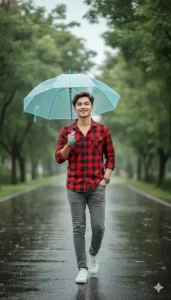
Create using uploaded image "A cheerful man enjoying a rainy day, clad in a checkered red shirt, grey pants, and white sneakers, with a light blue umbrella open above him. He is captured mid-stride on a wet asphalt path, surrounded by the natural beauty of trees and the soft glow of diffused daylight."
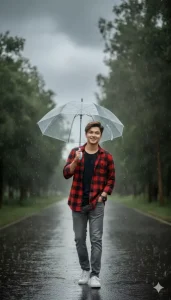
Create using uploaded image "Full body shot of a smiling man holding a transparent umbrella, dressed in casual plaid and denim, strolling down a rain-soaked road. Water droplets are visible in the air, and the background features blurred green foliage and trees under an overcast sky."
How To Select Photos?
The most important thing we need for this is our prompts. Without a prompt, we can’t create a photo like this, and we already have many forms available. I’m going to share them with you, and you can use them to create this viral photo. You’ll notice that everyone tells you how to create such a photo, but they don’t explain the correct method. Most people don’t know how to create such a photo using Google Gemini using prompts. Even those who teach photo creation don’t know how to write a prompt correctly or can’t give you accurate results. But here, if you use this prompt once, you’ll realize that you can create an amazing photo with all the prompts we’ve provided.
How To Create Instagram Trending Rain Ai Photo Editing
To do this, first open the Google Gemini application, where you need to paste the prompt. Paste the prompt there, click the “plus” option, and upload the photo. You can upload any photo there, and then you can make any corrections to the prompt. For example, if you want something nice or different, you’ll need to customize the prompt. That’s what I’m going to tell you. You can make any corrections to the front. After that, click the “Generate” option, which will give you a good result. Only then will your editing go viral. Then, you can simply click “Generate,” and your photo will be ready to be made.
Conclusion
The details I’ve explained are absolutely perfect, and this will make your editing 100% accurate. The results we’ve provided have made many people’s edits go viral, and many people have already done similar things on different trends. You should also follow these steps to edit yours so that your editing can go viral, and you can gradually create photos that go viral.